
Anime Chronicles Stat Points Guide: Where to Spend Them and What Each Stat Does
Where to spend stat points in Anime Chronicles, what Melee, Weapon, Health and Agility do, and what to know before allocating points to each character.
Quick answer
You spend stat points from the in-game menu, under Stats: Melee and Weapon add damage percentage, Health adds HP, and Agility adds movement speed. Each character keeps its own points.
- Open the menu, choose Stats, and spend with the x1, x5, x10 or MAX buttons.
- Melee and Weapon display as damage percentages, Health as HP, and Agility as a speed percentage.
- Points are tracked per character, so what you spend on one character never pools into another.
- The panel can flag one stat as BEST for the character you are viewing, like Weapon for Alkali.
Stat points are Anime Chronicles' per-character growth currency: you collect them by playing, then trade them for damage, HP or movement-speed gains on one specific character. This page covers where the spending screen lives, what each of the four stat lines does, and the panel details worth knowing before you commit points.
Where you spend stat points
Everything happens on one screen, the Stats panel in the game menu:
- Open the game menu.
- Choose Stats.
- Check your unspent balance, shown in the form “5 POINTS TO SPEND”.
- Pick a stat line and press a spend button - x1, x5, x10 or MAX - to commit that many points in one go.
- Read the result on the panel itself: every stat line displays its current value, so a Weapon line holding 5 points shows +10% damage.
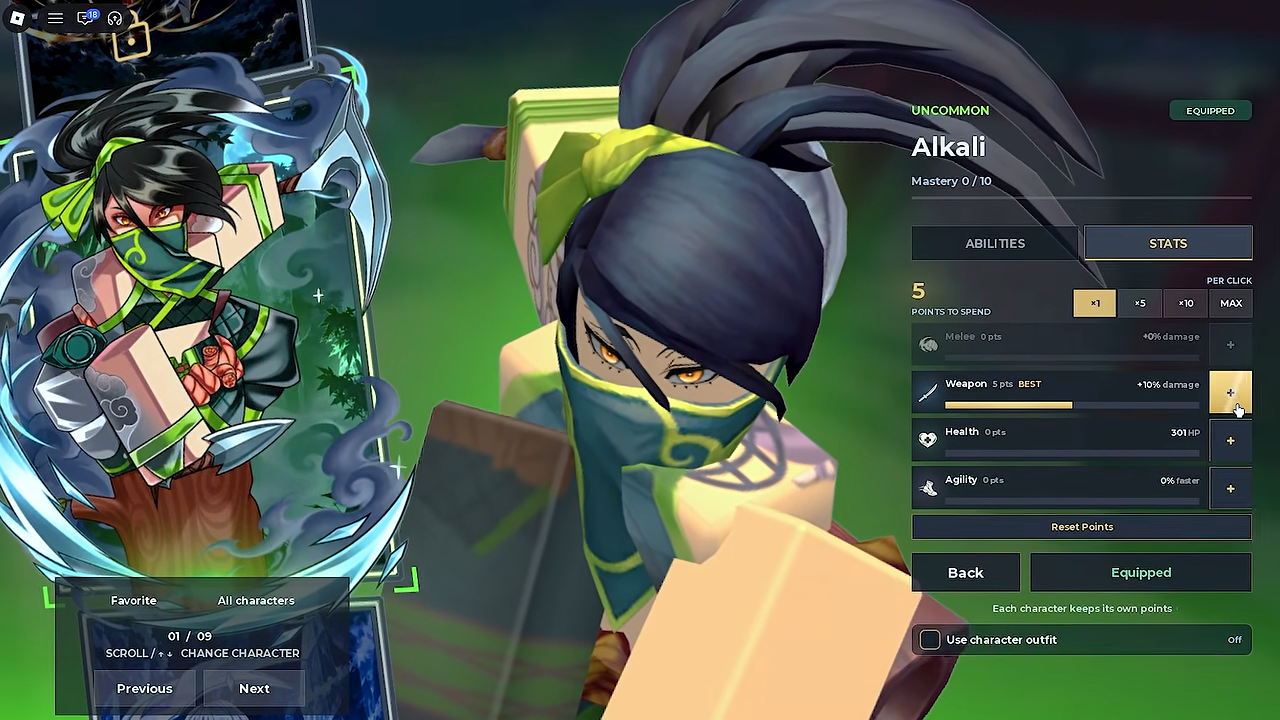
Spending works wherever the menu opens, and you can drop several points into one stat in a single click - early players topped up between fights this way rather than clicking one point at a time.
The same panel carries a Reset Points button beside the spend controls; how undoing an allocation works is its own topic, covered in the Anime Chronicles stat reset guide.

What the four stats do
The Stats panel tracks exactly four stat lines:
Data table
| Stat | How it displays | Example panel value |
|---|---|---|
| Melee | Damage percentage | +0% damage at 0 points |
| Weapon | Damage percentage | +10% damage at 5 points |
| Health | HP total | 301 HP at 0 points |
| Agility | Speed percentage | 0% faster at 0 points |
The example values come from the panel of a freshly unlocked Alkali in first-look footage: Melee at 0 points, Weapon at 5 points reading +10% damage, Health at 0 points reading 301 HP, and Agility at 0 points.
Melee and Weapon are two separate damage lines, each displayed as a percentage of extra damage. Health displays as a flat HP number, while Agility displays as a “faster” percentage - movement speed. Because the two damage stats are distinct lines, which one a character actually wants is a real decision, and that is exactly what the panel's BEST marker addresses: on Alkali's panel, the “BEST” tag sat on Weapon.
What to know before you allocate
- Points are per character. The panel carries the note “Each character keeps its own points”, so points spent on one character never pool with another. Points stay separate per character - Alkali, for example, arrived with 5 points waiting on her panel.
- The game marks a recommended stat. The panel can tag one stat “BEST” for the character you are viewing. One player simply followed that hint, saying the game “says what is good for my character.”
- Unspent points announce themselves. When a balance is waiting, the main world HUD shows an “Unspent Stat Points” toast that directs you to open Stats.
- Points come from normal play. One player had accumulated 24 points just by progressing the story, so it pays to check the panel whenever the toast appears.
- A Reset Points button is on the panel. It sits alongside the spend controls; the details of resetting an allocation are covered in the stat reset guide.
How early players split their points
None of these are proven optimal builds - they are the allocation choices early players actually made, shown here as illustrations of what the panel offers:
- All-in on one stat. One player put his entire balance into Weapon for Alkali, following the panel's “BEST” tag.
- A damage-and-speed split. Another went mostly Melee and put the remainder into Agility.
- Spending for a specific fight. Heading into the difficult demon-slayer questline on Mount Natagumo, one player added points to Health before pushing on, and the other topped up between fights because the quest's enemies were so tanky.
Because every character keeps its own points, an allocation you regret on one character has no effect on the rest of your roster. For where stat spending fits into the wider game, see the Anime Chronicles beginner guide, and for fuller character setups beyond raw stats, see the Anime Chronicles builds guide.
Related Guides
How to Reset Stat Points
Find the Reset Points button on the STATS panel, and what the reset product costs before you rebuild a character.
How to Plan Stats and Artifacts
Plan a build end to end: pick the stat the panel flags BEST, spend points wisely, and finish the loadout with artifacts.
Beginner Guide: Your First Session
Follow a complete first-session route from spawn to your first boss: training dummy, Akali's quests, free Alkali, and Zed.